The Best Tickerly Alternatives for Automating TradingView Strategies (2026)
Tickerly is a solid entry point into TradingView automation—but it’s not the only option, and for many traders it isn’t the right one. Whether you’ve hit a wall with supported brokers, need a no-code strategy builder that goes deeper, or want better support for U.S. equity and options markets, there are now several mature platforms worth knowing about.
This guide breaks down the best Tickerly alternatives available in 2026, what each one does well, where they fall short, and which type of trader is likely to get the most value from each. No fluff—this is the comparison you’d want before switching.
Why Traders Look for Tickerly Alternatives
Tickerly does a lot right: it’s reasonably priced, supports a wide range of crypto exchanges, and the four-click setup for connecting TradingView alerts is genuinely easy. But a few gaps consistently come up in the algo trading community:
Limited U.S. stock and options broker support. Tickerly’s non-crypto broker list is short—Oanda (forex), Capital.com, and Alpaca. If you’re trading equities at Interactive Brokers, Webull, or Tastytrade, you’re out of luck.
Alert volume caps on lower tiers. The entry-level plan caps out at 100 alerts per day. If you run high-frequency or multi-asset strategies, that ceiling comes up fast.
No native strategy builder. Tickerly assumes you’re already bringing a TradingView Pine Script strategy to the table. There’s no tooling to help you build, test, or iterate on strategy logic within the platform itself.
MetaTrader support costs extra. MT4/MT5 connectivity is locked to the highest-tier plan ($39/month), which isn’t ideal if you just want basic forex automation.
None of these are dealbreakers for every trader. But if any of them match your situation, read on.
What to Look For in a Tickerly Alternative
Before jumping to any comparison, it helps to be clear about what actually matters for your setup. The platforms below differ significantly on these dimensions:
Broker coverage: Does the platform connect to the brokers you actually use? This is the most common reason traders switch. Crypto-only platforms are useless for equity traders, and vice versa.
Strategy creation tools: Some platforms are pure relays—they receive a webhook and fire an order. Others include backtesting, strategy builders, or AI-assisted logic creation. Depending on your skill level, the latter can save enormous time.
Alert throughput: How many signals per day can you process? If you’re running multiple strategies on multiple assets, per-day alert limits become a real operational constraint.
Latency and execution reliability: For strategies that depend on timing, server proximity to exchange matching engines matters. Ask or test this before committing.
Pricing and scaling: Some platforms charge per strategy, some per account, some flat-rate. Know how costs scale with your trading footprint.
Top Tickerly Alternatives in 2026
1. Ontology Trading
Best for: Traders who want AI-assisted strategy creation and broad U.S. broker coverage
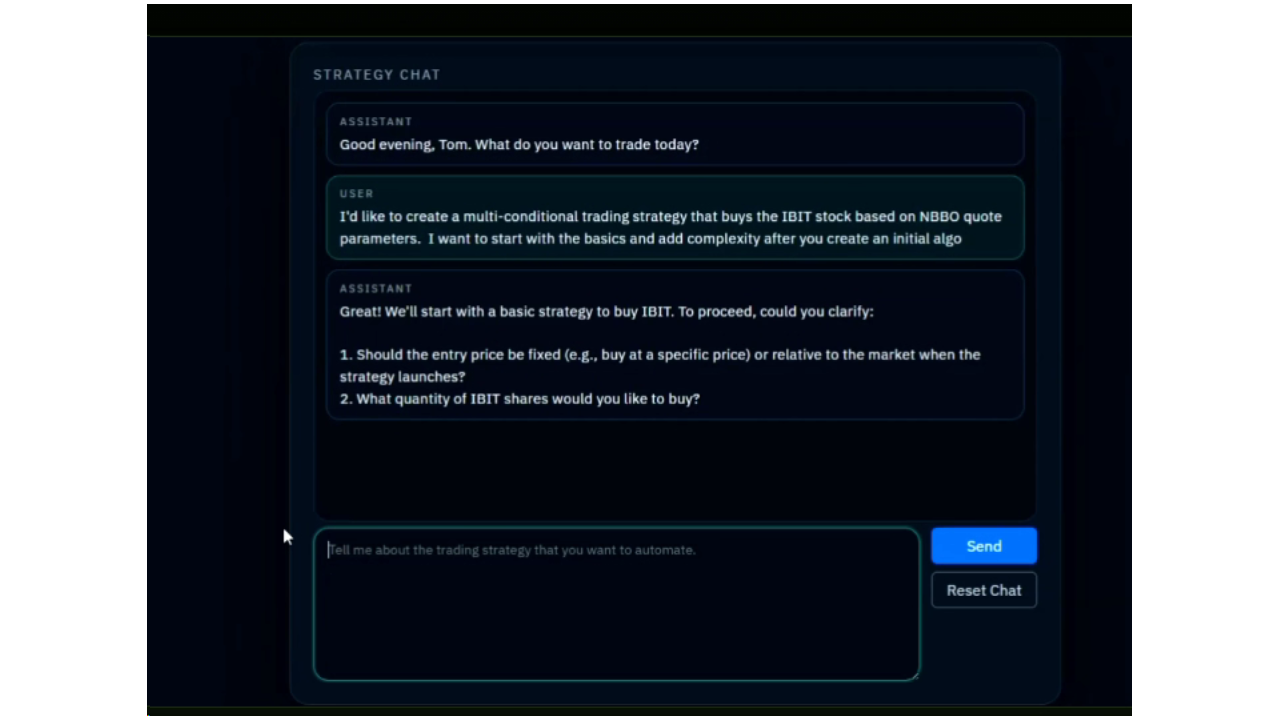
Ontology Trading stands out from most TradingView automation platforms because it pairs a fast webhook relay with an enterprise-grade AI strategy builder. Where Tickerly assumes you’re arriving with a finished Pine Script, Ontology lets you build strategies in plain language through a chat interface—describing what you want in conversational terms—and then automates execution directly.
The broker list is notably strong for U.S.-based retail traders: Interactive Brokers, Kraken, Coinbase, Alpaca, Webull, and Tastytrade are all supported. That’s a materially different lineup than Tickerly, particularly for anyone trading equities or options at a major U.S. brokerage.
The relay component works the same way most automation platforms do—TradingView fires a webhook alert, Ontology receives it and routes the order to your connected broker. The differentiator is the AI strategy layer above that: you don’t need to know Pine Script to get started, and existing strategies can be refined without digging into code.
For traders who want to move from idea to live automation without a programming background—or who are tired of manually translating trading hypotheses into Pine Script—that’s a significant practical advantage. You can learn more or get started at ontologytrading.com.
Strengths: AI strategy builder, strong U.S. broker coverage, no-code automation, fast execution relay
Limitations: Newer platform with smaller community than some established competitors
2. TradersPost
Best for: U.S. equity and futures traders on Alpaca, Interactive Brokers, or Tradier
TradersPost is one of the most established TradingView automation platforms in the U.S. market. It handles stocks, options, futures, and crypto across a solid roster of supported brokers including Alpaca, Interactive Brokers, Tradier, and Webull. The platform supports TradingView webhook alerts natively and includes paper trading for testing before going live.
Pricing is on the higher end compared to Tickerly—plans start around $49/month—but the broker depth and support quality justify the cost for active traders. If you’re primarily trading equities or futures at a U.S. broker, TradersPost is often the first recommendation in the algo trading community.
Strengths: U.S. equities/futures support, paper trading, strong community resources
Limitations: More expensive, no strategy builder
3. PineConnector
Best for: Forex traders running MetaTrader 4 or MetaTrader 5
PineConnector is the go-to solution if your broker runs on MT4 or MT5—which covers a large portion of the forex and CFD world. The setup works by installing a PineConnector EA on your MetaTrader terminal, then sending formatted alert messages from TradingView that the EA interprets as order commands.
It’s powerful for what it does, with support for complex order types including partial closes, trailing stops, and position scaling. The trade-off is that it requires some familiarity with MetaTrader configuration and doesn’t support stock or crypto-native exchanges directly. If you’re not on MT4/MT5, look elsewhere.
Strengths: Deep MT4/MT5 support, advanced order types, large user base
Limitations: Requires MetaTrader, limited crypto and equity exchange support
4. AutoView
Best for: Crypto traders who want a low-cost, browser-based solution
AutoView is a browser extension (Chrome) that listens for TradingView alerts and routes them to supported crypto exchanges. It’s one of the older solutions in this space and has a loyal user base, particularly among Binance and Kraken traders.
The main limitation is architectural: because it runs as a browser extension, your computer (or a remote VM) needs to stay running and connected. There’s no cloud execution. That said, it covers a wide range of crypto exchanges and is cheaper than most alternatives—a reasonable starting point for traders testing automation concepts before scaling up.
Strengths: Low cost, wide crypto exchange support, established community
Limitations: Requires browser/PC to stay running, no stock or forex brokers, limited order sophistication
5. PickMyTrade
Best for: Beginners who want maximum simplicity and guided setup
PickMyTrade markets itself as the most beginner-friendly TradingView automation tool, and that reputation is largely deserved. The setup process is guided, documentation is thorough, and supported brokers include Interactive Brokers, Tradovate, Rithmic, Binance, and TradeStation.
At $50/month for the base tier, pricing is similar to TradersPost. The trade-off is that advanced users may find the feature set limiting compared to platforms that offer more granular order control. But for a trader who’s new to automation and wants a working setup in an afternoon, it’s worth considering.
Strengths: Easy onboarding, futures and equities support, solid documentation
Limitations: Less flexibility for advanced strategies, higher cost than Tickerly
Side-by-Side Comparison
| Platform | Starting Price | Key Brokers Supported | Strategy Builder | Alert Limit |
|---|---|---|---|---|
| Ontology Trading | See site | IB, Kraken, Coinbase, Alpaca, Webull, Tastytrade | AI-powered, no-code | See site |
| Tickerly | $19/mo | Binance, ByBit, Kraken, OKX, Oanda, Alpaca | None | 100–2500/day |
| TradersPost | ~$49/mo | IB, Alpaca, Tradier, Webull | None | Unlimited |
| PineConnector | ~$20/mo | Any MT4/MT5 broker | None | Varies |
| AutoView | ~$10/mo | Binance, Kraken, Coinbase, others | None | Unlimited |
| PickMyTrade | ~$50/mo | IB, Tradovate, Rithmic, Binance, TradeStation | None | Unlimited |
How to Switch from Tickerly to Another Platform
Migrating between TradingView automation platforms is generally less painful than it sounds. Here’s the practical process:
Step 1 — Document your current alert setup. In TradingView, open each active alert and copy the webhook URL and message body. You’ll be replacing the URL (and possibly the message format) for each alert.
Step 2 — Set up your new platform’s broker connection. Each platform will require API key generation at your broker (or OAuth authorization). Follow the new platform’s specific guide—most have detailed walkthroughs.
Step 3 — Update your TradingView alerts. Point each alert’s webhook to the new platform’s endpoint. If the new platform expects a different JSON message format (most do), update the alert message body accordingly.
Step 4 — Test in paper/demo mode first. Fire your alerts in TradingView and verify that orders are reaching your broker in the expected format before switching to live trading.
The whole process typically takes an hour or two per strategy, less if the platforms use similar JSON schemas.
Which Tickerly Alternative Is Right for You?
The honest answer depends entirely on what Tickerly isn’t giving you:
If you’re a U.S. equity or options trader who needs Interactive Brokers, Webull, or Tastytrade connectivity and wants a platform that can help you build strategies without coding, Ontology Trading is worth a close look.
If you’re primarily a U.S. futures or equity trader who already has a Pine Script strategy ready and wants a well-documented relay to Interactive Brokers or Tradovate, TradersPost or PickMyTrade are solid choices.
If you trade forex via MetaTrader, PineConnector remains the most mature and feature-rich option for that specific setup.
If you’re on a tight budget and trading crypto only with a simple strategy, Tickerly itself or AutoView may still make sense—neither Ontology nor TradersPost will beat Tickerly’s $19 entry price for pure crypto automation.
The key is being honest about your actual broker, asset class, and strategy complexity needs before committing to a platform. Most of the options above offer a trial period—take advantage of that.
Frequently Asked Questions
Is Tickerly good for stock trading?
Tickerly’s stock broker support is limited. At the time of writing, it connects to Alpaca and Capital.com for non-crypto trading, plus Oanda for forex. If you’re trading equities at Interactive Brokers, Webull, or Tastytrade, you’ll need to look at alternatives like Ontology Trading or TradersPost.
Does Tickerly support Interactive Brokers?
No, Tickerly does not currently support Interactive Brokers. For TradingView automation with Interactive Brokers, platforms like Ontology Trading, TradersPost, or PickMyTrade are your best options.
What is the cheapest Tickerly alternative?
AutoView is typically the lowest-cost option for crypto-focused traders, starting around $10/month. For stock and futures traders, Ontology Trading and TradersPost offer the best feature-to-cost ratio depending on your broker needs.
Can I automate TradingView alerts without coding?
Yes—all the platforms in this guide support no-code automation using TradingView’s webhook alert system. You set up an alert in TradingView, point the webhook at your chosen platform, and configure your broker connection. Ontology Trading additionally includes an AI-powered strategy builder that lets you create and refine strategy logic in natural language, without writing Pine Script.
How does TradingView automation work at a technical level?
TradingView allows alerts to send an HTTP POST request (webhook) to a URL of your choice whenever alert conditions are met. Automation platforms host a webhook endpoint, receive the alert payload, parse it for order parameters (symbol, direction, size, etc.), and then route the order to your connected broker via its API. The platforms differ mainly in which brokers they support and what additional features sit on top of this core relay.
Is it safe to connect my broker to a TradingView automation platform?
Safety depends on your configuration. Reputable platforms use API keys scoped to trading permissions only—never withdrawal permissions. Always create dedicated API keys for automation platforms, never reuse keys across services, and regularly audit active API connections from within your broker account. Starting with a paper trading or demo account before going live is strongly recommended.
What happens if the automation platform goes down?
This is a real operational risk. If the relay platform experiences downtime, your alerts won’t execute—meaning your strategy runs unmanaged until service resumes. Mitigation strategies include using platforms with high uptime SLAs, setting manual stop-losses at your broker independently of your automation, and monitoring alert delivery via TradingView’s alert history log.